Microsoft Teams (Reports)
This feature requires the TrueDEM® Advanced for Microsoft Teamslicense
The Microsoft Teams menu gives access to various reports focusing on Microsoft Teams and Call analytics.
Reports
Teams Version Reports:
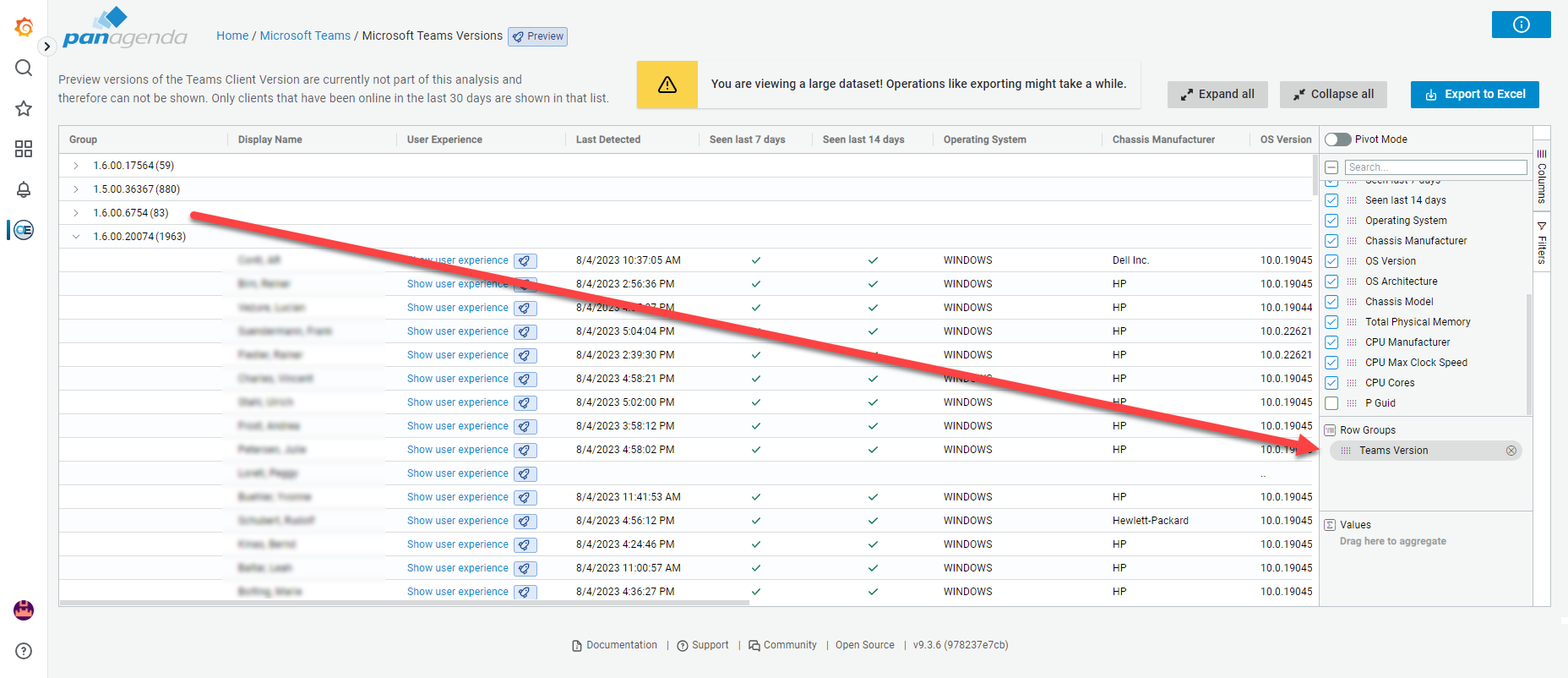
Monitored Teams Versions: An overview showing the users for which data is collected categorized by their installed Microsoft Teams client version as well as other device and OS specific information. This view allows you to investigate the installed Microsoft Teams environment as it is being monitored by TrueDEM. Using the table and pivot options on the right side of the table, you can do further anaylsis concerning the roll out across device types and configurations. (See “Monitored Teams Versions (Report)” for more info on how to use the report)
Teams Versions Overview: An overview of all versions detected in tenant calls across all devices (including unmonitored devices)
Applications Used in Calls: Report showing applications & bots that were part of meetings. This report is ideal to identify custom or third party bots but also shows native Microsoft bots. Select a bot in the top left table to see details on the calls it was used in and the distribution of usage across time.
Tenantwide Overview: This report gives you a summary insight into the Microsoft Teams calls in your environment made during the last 7 days (adjustable). Information includes general KPI’s, call quality indicators, issue directions (send/receive) and the top ISP’s utilized. It also differentiates between the area of problems (Video / Audio) and types of issues occuring.
Teams Network Reports: ->
Managed Networks Call Overview: This report provides insights into the managed networks that are showing Teams call related network issues. It allows admins a quick insight into potentially problematic networks as well as drill down reports to see more details per managed network.
**WiFi Network Analysis:**This report will give you insight into the readiness and performance of WiFi networks used for making Teams Calls. It provides insights into WiFi networks (both office & remote networks) that are potentially substandard for doing Teams calls on. It allows you to proactively identify these networks and the users who rely on them so you can take remediation actions or inform users. For more information please see WiFi Networks Analysis.
Network Call Quality: Shows the Call quality per ISP and per subnet (if provided). To get the subnet information included, contact panagenda support about the procedure.
Teams Relay Region Analysis: This report gives insight into which Teams relays were used within the organisation in the last 30 days, and what the latency is for each of them. A secondary column gives insight into how the latency was for each Teams relay in the prior 3 months for comparison purposes.
Teams Media Analysis: This report provides insight into how the different media options are being used within Teams calls. This report can help identify cultural habits for the organisation as well as per department.
Live Teams Call Status: This overview shows calls taking place in your environment at the moment with information in errors and problems per network and user.
Enterprise Voice: ->
Direct Routing Report: Provides insight into the direct routing connections and concurrency on trunks. To see details for a specific country or trunk, simply click on the entry to see more details.
EV Util & Cost Optimization: Report to give you insight into the license utilization of Enterprise Voice licenses. Additional sub reports can be accessed using the “Related” links in the right upper corner.