
TrueDEM® Homepage
This is the first page you will see when you enter the TrueDEM Portal. This is your starting point for information and troubleshooting of Microsoft 365 services and also the User Search page. Navigation is done through the menu options on the left. Which menu items you see here depends on your license, but the five below are available to all.
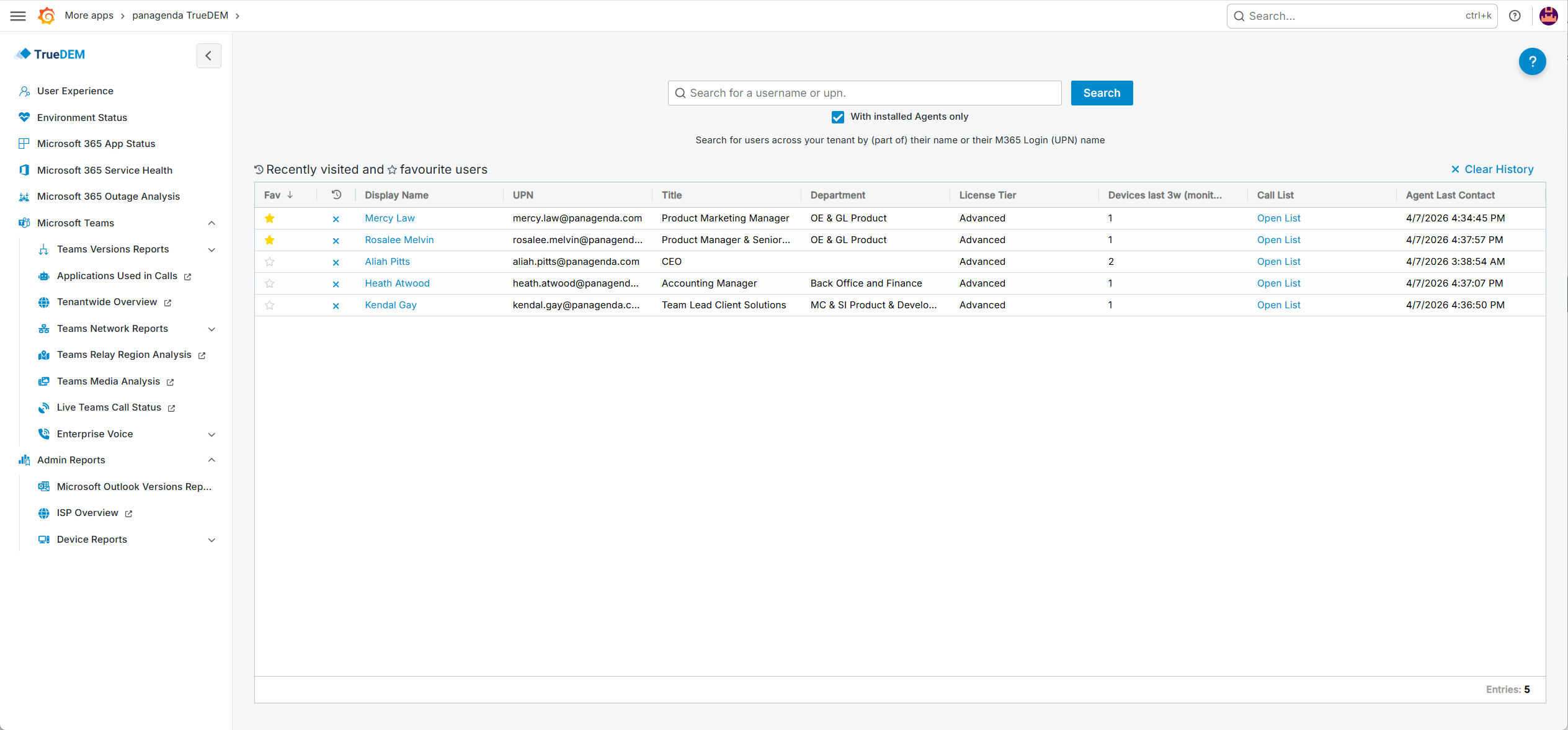
From the Home page, you can explore the following topics:
- The User Search option is a good place to start when your immediate concern is a user with problems. This page is automatically opened when opening TrueDEM.
- If you suspect a global issue, such as a sudden influx of tickets about Teams, choose Environment Status for the “big picture.”
- Similar to the Environment Status, the Microsoft 365 App Status page gives you insight into what’s going on with the apps and functionalities your users rely on, and how they are performing on the various platforms.
- The Microsoft 365 Service Health option encapsulates all the news from Microsoft about Microsoft 365 services. Check here for the latest alerts if you suspect an issue is outside of your organization.
- Microsoft Outage Analysis provides you with a list of resolved issues for which a more detailed impact analysis is available.
- The Microsoft Teams option gives you access to reports specifically geared towards Microsoft Teams and Enterprise Voice insights.
- Admin Reports provides top technical network and hardware reports about your environment.

You can return to this page at any time by clicking the Grafana icon in the top left of the screen, or using the breadcrumb menu at the top of pages.